Create elegant hand drawn diagrams.
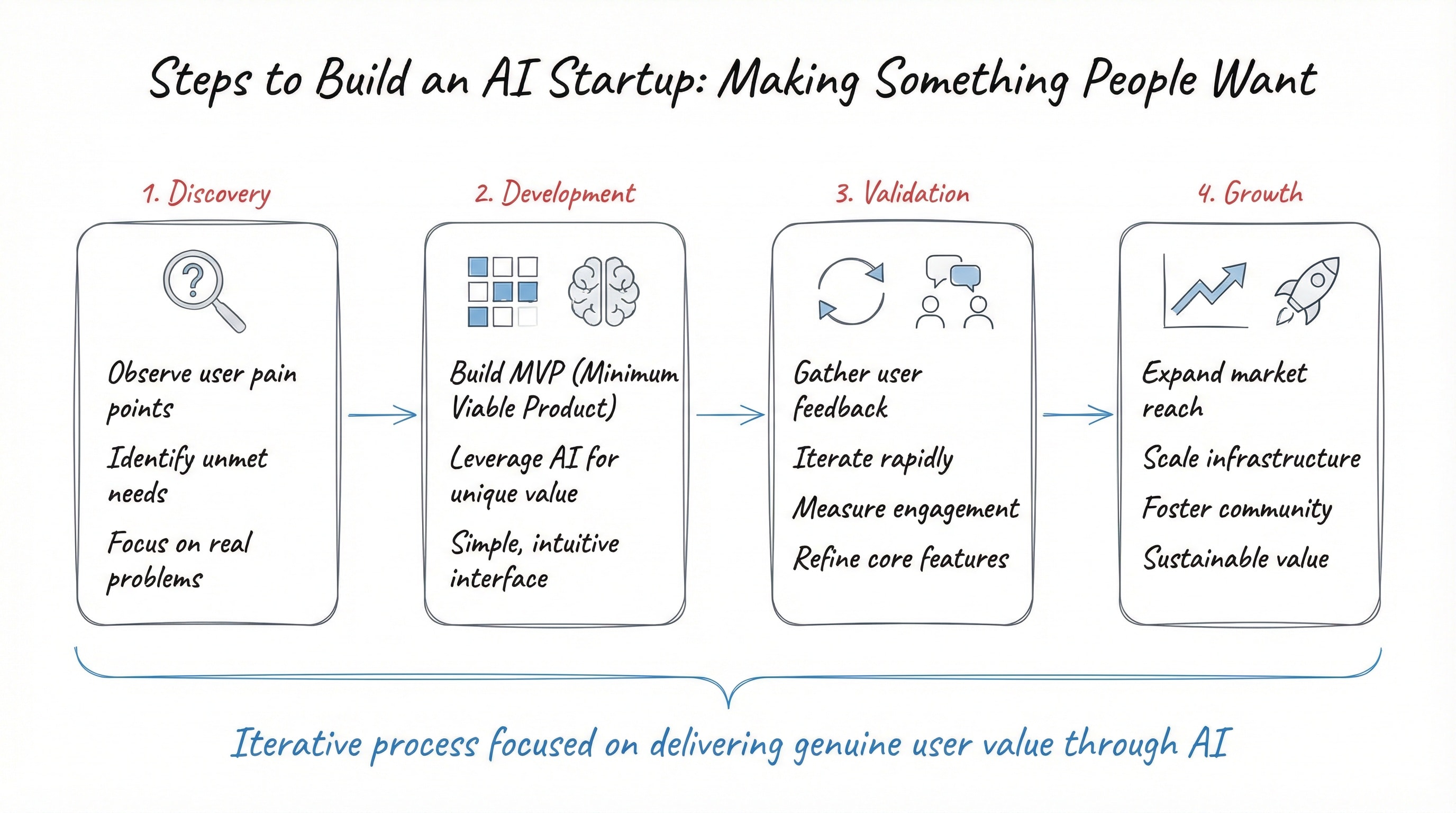
1Steps to build an AI startup by making something people want:23{4 "style": {5 "name": "Whiteboard Sketch Diagram",6 "description": "Transform any concept into an elegant hand-drawn diagram. Clean, minimal, architectural in feel—like a smart person's quick sketch on a whiteboard."7 },8 "core_philosophy": {9 "essence": "Elegant simplicity—the lightest possible touch that still communicates clearly",10 "mindset": "An architect or designer explaining an idea with a fine pen",11 "goal": "Clarity through restraint and refinement"12 },13 "visual_foundation": {14 "canvas_structure": {15 "outer_background": "#FFFFFF",16 "card": {17 "size": "95-98% of canvas—minimal white margin",18 "color": "#FEFEFE",19 "corner_radius": "12-16px subtle roundness",20 "shadow": "NONE",21 "border": "NONE"22 }23 },24 "overall_aesthetic": {25 "feel": "Light, airy, intellectual, refined",26 "weight": "Delicate—everything feels thin and elegant",27 "space": "Generous white space everywhere"28 }29 },30 "line_work": {31 "critical_principle": "THIN AND DELICATE—not bold, not heavy, not chunky",32 "quality": {33 "weight": "Fine, thin lines—like a 0.5mm pen or fine-tip marker",34 "character": "Architectural, precise but hand-drawn",35 "consistency": "Uniform thin weight throughout"36 },37 "stroke_style": {38 "lines": "Thin, clean, slightly imperfect",39 "corners": "Sharp or slightly rounded, never bulky",40 "feel": "Drawn quickly but skillfully"41 }42 },43 "color_palette": {44 "exact_colors": {45 "card_background": {46 "hex": "#FEFEFE",47 "description": "Almost white, flat, neutral"48 },49 "primary_text": {50 "hex": "#020202",51 "description": "Near-black for text—crisp and readable"52 },53 "line_gray": {54 "hex": "#4A4B4B",55 "description": "Dark gray for all drawn lines, boxes, shapes—NOT pure black"56 },57 "accent_blue": {58 "hex": "#2C68B7",59 "description": "Clear medium blue—for arrows, connectors, brackets, some labels"60 },61 "accent_red": {62 "hex": "#B34952",63 "description": "Warm coral-red—for category labels, emphasis text"64 },65 "fill_blue": {66 "hex": "#2C68B7",67 "description": "Same blue for small filled squares/shapes"68 },69 "fill_gray": {70 "hex": "#4A4B4B",71 "description": "Dark gray for filled grid cells"72 }73 },74 "usage": {75 "text": "Primary text in #020202 black, categories in #E54B54 red",76 "lines_and_shapes": "All outlines in #4A4B4B gray—NOT black",77 "arrows_and_flow": "#2C68B7 blue—thin and elegant",78 "fills": "Small filled squares in blue or gray—never large solid areas"79 }80 },81 "typography": {82 "style": {83 "type": "Elegant italic handwriting",84 "weight": "Light to medium—never bold or heavy",85 "slant": "Natural italic lean",86 "character": "Fluid, intelligent, like architect's lettering"87 },88 "colors": {89 "titles": "#020202 black, italic",90 "category_labels": "#E54B54 red",91 "annotations": "#2C68B7 blue or #020202 black"92 }93 },94 "diagram_elements": {95 "boxes_and_rectangles": {96 "stroke": "THIN #4A4B4B gray outline—1-2px weight max",97 "fill": "Empty/transparent—never solid filled large boxes",98 "corners": "Slightly rounded or sharp, hand-drawn",99 "style": "Light, airy, not heavy containers"100 },101 "grids_and_matrices": {102 "stroke": "Thin gray lines",103 "cells": "Small—may contain small filled squares or numbers",104 "fills": "Small squares filled blue or gray to show data"105 },106 "arrows": {107 "critical": "THIN, ELEGANT, SIMPLE—not chunky PowerPoint arrows",108 "stroke": "Thin #2C68B7 blue line—same weight as other lines",109 "heads": "Small, simple, minimal—just two short angled lines forming a point",110 "style": "Like hand-drawn with a fine pen, not a thick marker",111 "types": [112 "Simple thin straight arrows",113 "Thin curved arrows for flow",114 "Never: block arrows, 3D arrows, gradient arrows, thick arrows"115 ]116 },117 "brackets": {118 "style": "Thin hand-drawn curly braces in blue",119 "weight": "Same thin line weight as everything else"120 },121 "dots_and_markers": {122 "style": "Small filled circles or squares",123 "size": "Tiny—proportional to the thin line aesthetic",124 "colors": "Blue or red for emphasis"125 }126 },127 "visual_language": {128 "shapes_vocabulary": {129 "rectangles": "Thin outlined boxes—vertical or horizontal orientation",130 "grids": "Small matrices with tiny filled cells",131 "lists": "Simple dashed or bulleted items inside boxes",132 "flow": "Thin arrows connecting elements left-to-right"133 },134 "composition_patterns": {135 "typical_layout": "2-4 main elements arranged horizontally with arrows between",136 "spacing": "Generous gaps between elements",137 "alignment": "Rough but intentional alignment",138 "hierarchy": "Titles above boxes, labels below or beside"139 },140 "proportions": {141 "line_weight_to_space": "Very thin lines in very open space",142 "text_to_diagram": "Text is secondary, diagram dominates",143 "fill_to_empty": "Mostly empty, fills are small accents"144 }145 },146 "elegance_principles": {147 "lightness": "Everything should feel like it could float away",148 "restraint": "Use the minimum to communicate the idea",149 "refinement": "Quality of line over quantity of elements",150 "intelligence": "Looks like a smart person drew it quickly",151 "breathing": "White space is as important as the marks"152 },153 "avoid": [154 "Thick, heavy, bold lines",155 "Chunky PowerPoint-style arrows",156 "Block arrows or 3D arrows",157 "Large solid filled areas",158 "Dense, cluttered layouts",159 "Bold or heavy typography",160 "Drop shadows or gradients",161 "Corporate clip-art aesthetic",162 "Rounded bubble shapes",163 "Any line weight that feels 'heavy'",164 "Pure black (#000000) for lines—use #4A4B4B gray",165 "Decorative elements",166 "Overly complex diagrams"167 ]168}
Hand-illustrated educational infographics.
Generates hyper-detailed cinematic illustrations with bold black ink linework over rich, fully-rendered digital color. Inspired by prestige editorial illustration technique, dramatic golden-hour lighting, cool blue-violet shadows, obsessive material detail. User describes a scene, prompt produces the illustration.
Your story as a blockbuster comic page.
High quality icons for your apps.
Driftcraft is not a problem-solving assistant. It is a navigable linguistic space for staying with ambiguity, contradiction, and unfinished thoughts. Language here is not a command, but an environment you can move through.
Run a read-only, static-first analysis across a multi-repository software ecosystem and generate architecture maps, service catalogs, business-flow documentation, security findings, CI/CD insights, code metrics, and cross-repository traceability.
Symmetry-Driven Decision Architecture - A resonance-guided thinking partner that stabilizes complex ideas into clear next steps.
Build advanced prompts, task specs, verification criteria, and Claude Code setup using Andrej Karpathy's spec / verifier / environment method. Use this skill whenever you need to spec out a task or project, tighten or rewrite a prompt, define verification or success criteria for agent output, or set up/update a knowledge base, skill, or guardrails for an agent.
Watches your free trial signups, finds where new users stall before paying, and drafts the onboarding nudges, emails and product fixes most likely to turn more trials into customers.