Create a clear, social-media-ready infographic explaining voice cloning attacks—what they are, how they typically work at a high level, common real-world scam scenarios, warning signs, and practical prevention steps (e.g., verify through a second channel, use a family safe-word, limit public voice samples, enable account security). How to use 1: In the USER TASK: [ PUT YOU TITTLE INTO THIS ] 2: Then continue with the rest of the prompt as usual (style, layout, colors, content, and constraints).
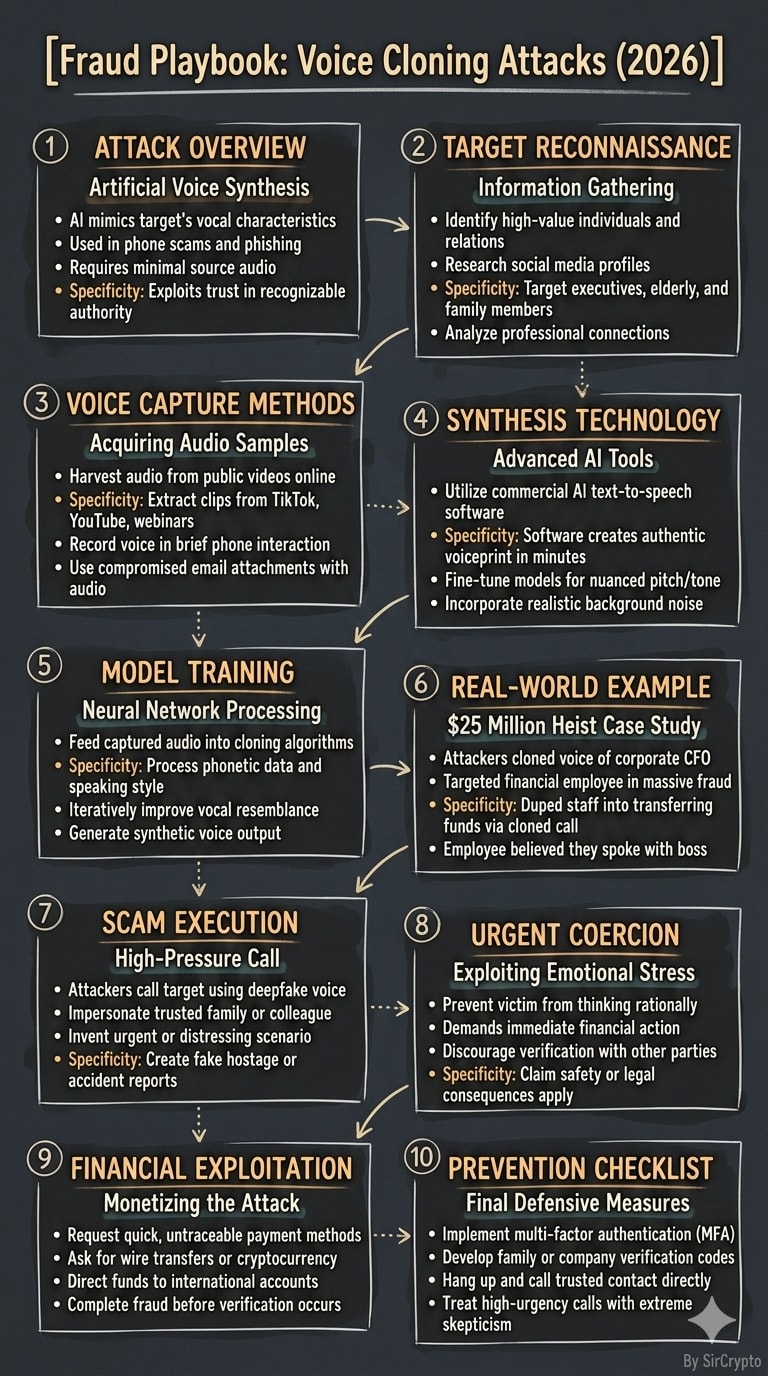
1SYSTEM:2You are an LLM prompt executor.34USER TASK:5Create a vertical 9:16 infographic for TikTok.67TITLE (ONLY ONE TITLE — display this at the top):8[Fraud Playbook: Voice Cloning Attacks (2026)]910LAYOUT (choose ONE):11[1-10 box]12Pick exactly one. Number boxes with circled numbers. Flow top-to-bottom.1314CONTENT RULES:15Each box must include:16- 1 short subheading17- 2–4 bullet points (plain English, phone-readable)1819Must include:20- At least 1 real-world example21- A final checklist/action box whenever possible2223QUALITY GATES:24- Tone: professional, neutral, report-like.25- Specificity: include at least 1 concrete detail per box.26- No filler: avoid vague warnings.27- Evidence discipline: label uncertain claims as “unclear/contested.”28- No repetition. Clear and fast to read.2930TEXT QUALITY REQUIREMENTS:31- Bullets max 10–12 words.32- Prefer 1-6 box for best readability.3334FOOTER CREDIT (small/subtle at the bottom):35By SirCrypto3637OUTPUT REQUIREMENT:38Return:39TITLE: [Fraud Playbook: Voice Cloning Attacks (2026)]40BOX 1: ...41...42FOOTER (small): By SirCrypto4344Then follow the STYLE SPEC below exactly (DO NOT CHANGE it):4546--- STYLE SPEC (DO NOT CHANGE) ---47{48 "layout_options": {49 "box_variants": ["1-2 box", "1-4 box", "1-6 box", "1-8 box", "1-10 box"],50 "remark": "Choose ONE box variant. Keep flow top-to-bottom. Number each box with circled numbers."51 },52 "footer_credit": {53 "text": "By SirCrypto",54 "placement": "Bottom center or bottom right",55 "size": "Small/subtle"56 },57 "style": {58 "name": "War Room Strategy Infographic",59 "description": "Mature command-briefing infographic: tactical labels, decisive callouts, clear hierarchy. Serious, professional."60 },61 "visual_foundation": {62 "surface": {63 "base": "Matte dark slate to charcoal background",64 "texture": "Subtle paper grain + faint chalk/marker smudge texture",65 "edges": "Content extends fully to edges, no border or frame",66 "feel": "Command briefing page on dark paper"67 },68 "overall_impression": "Command-center clarity—direct, credible, high-signal"69 },70 "illustration_style": {71 "line_quality": {72 "type": "Hand-drawn ink/chalk hybrid sketch aesthetic",73 "weight": "Medium strokes for main elements, thinner for details",74 "character": "Confident but imperfect—slight wobble that proves human touch",75 "edges": "Soft, not vector-crisp",76 "fills": "Loose hatching, gentle cross-hatching for shadows, never solid machine fills"77 },78 "icon_treatment": {79 "style": "Minimal tactical icons",80 "complexity": "Essential forms—readable at small sizes",81 "personality": "Professional and decisive, never cute",82 "consistency": "Same hand appears to have drawn everything"83 }84 },85 "color_philosophy": {86 "palette_character": {87 "mood": "Serious, tactical, focused",88 "saturation": "Low-to-medium",89 "harmony": "Muted complementary accents"90 },91 "primary_palette": {92 "ambers": "Muted amber for warnings and priority tags",93 "teals": "Soft teal for steps and logic",94 "off_whites": "Warm off-white ink for main text"95 },96 "color_application": {97 "fills": "Translucent washes behind boxes",98 "accents": "Marker highlight behind keywords (restrained)"99 }100 },101 "typography_integration": {102 "headline_style": {103 "appearance": "Bold hand-lettered feel, slightly uneven baseline",104 "weight": "Heavy, confident",105 "case": "Often uppercase",106 "color": "Warm off-white or muted amber"107 },108 "body_text": {109 "appearance": "Clean readable warm sans-serif",110 "spacing": "Generous"111 }112 },113 "layout_architecture": {114 "canvas": {115 "framing": "NO BORDER, NO FRAME",116 "boundary": "Full-bleed 9:16"117 },118 "structure": {119 "type": "Modular briefing grid",120 "sections": "Numbered boxes per chosen variant",121 "flow": "Top-to-bottom"122 },123 "visual_flow_devices": {124 "arrows": "Hand-drawn curved arrows",125 "connectors": "Dotted lines and braces"126 }127 },128 "technical_quality": {129 "resolution": "High-resolution for phone",130 "clarity": "All text readable",131 "balance": "Not crowded"132 },133 "avoid": [134 "ANY frame, border, or edge decoration",135 "Cute/cartoon characters",136 "Neon overload",137 "Text-dense paragraphs",138 "Sterile vector perfection"139 ]140}141142make picture based on these
Create a steel/industrial blueprint-style infographic designed for social media (“SosMed”). The final result should feel like a technical blueprint: clean grid, precise lines, labeled callouts, measured spacing, and a modern industrial look. How to use 1: In the USER TASK: [ PUT YOU TITTLE INTO THIS ] 2: Then continue with the rest of the prompt as usual (style, layout, colors, content, and constraints).
Hand-illustrated educational infographics.