This is a structured image generation workflow for creating cyber security characters. The workflow includes steps such as facial identity mapping, tactical equipment outfitting, cybernetic enhancements, and environmental integration to produce high-quality, cinematic renders. After uploading your face and filling in the values in the fields, your prompt is ready. NOTE: The sample image belongs to me and my brand; unauthorized use of the sample image is prohibited.
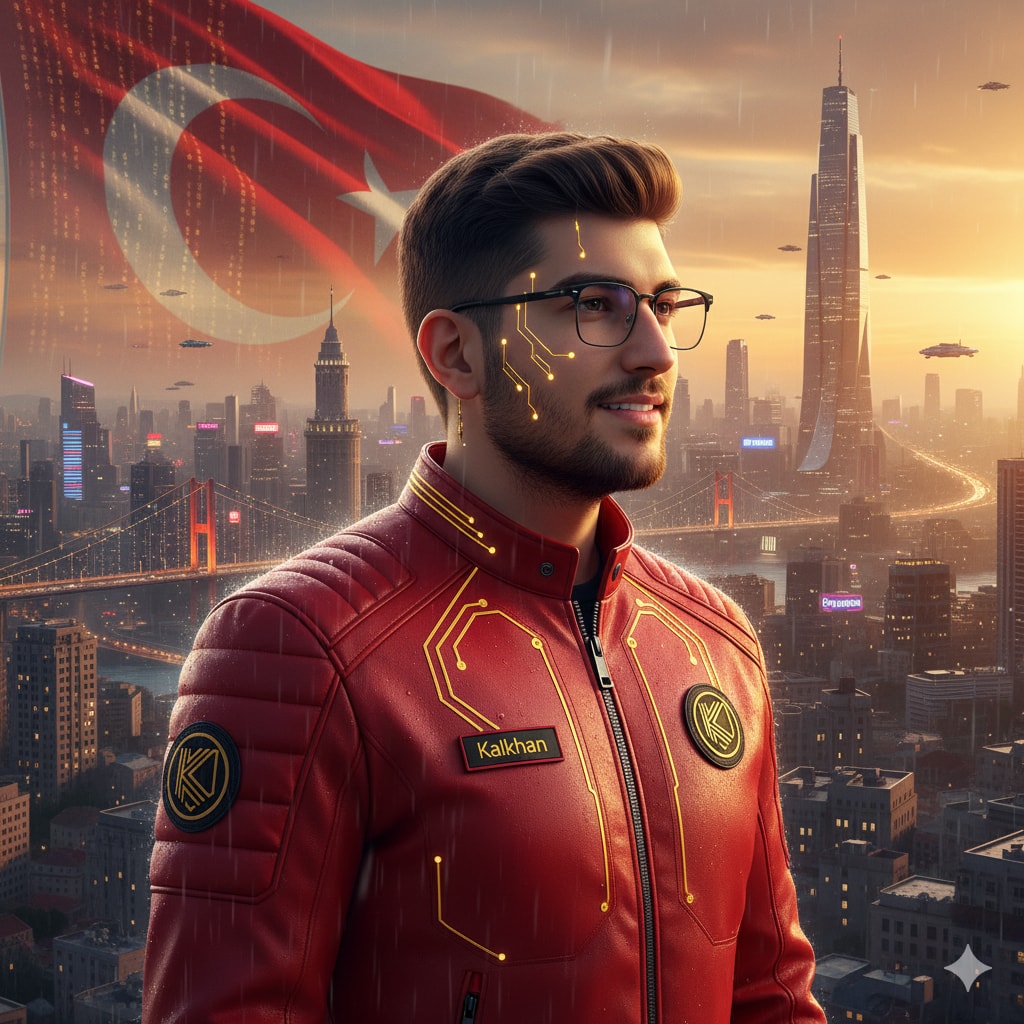
1{2 "name": "Cyber Security Character",3 "steps": [4 {5 "step_1": "Facial Identity Mapping",6 "description": "Maintain 100% facial consistency based on the provided reference photos. Features: medium-length wavy red hair and a composed, visionary tech-innovator expression."7 },8 {9 "step_2": "Tactical Gear & Branding",10 "description": "Outfit the subject in a sleek red tactical jacket with intricate gold circuitry textures. Correctly integrate the '' name and the specific '' logo emblem onto the chest piece."11 },12 {13 "step_3": "Cybernetic Enhancement",14 "description": "Apply subtle, minimalist gold-accented cybernetic interface patterns onto the skin of the face, ensuring they blend naturally with the {Style:Cyberpunk} aesthetic."15 },16 {17 "step_4": "Environmental Integration",18 "description": "Design a background featuring the flag merged with glowing golden digital circuits. Include a distant cinematic futuristic skyline of a metropolis (Cyberpunk )."19 },20 {21 "step_5": "Lighting & Cinematic Render",22 "description": "Utilize warm, dramatic side lighting from the right to cast a soft silhouette onto the background. Render in 4K ultra-realistic quality with hyper-detailed textures."23 }24 ]25}
The prompt "Ultra-High-Resolution Portrait Restoration" guides the user through the process of transforming an old, blurry, and damaged portrait photograph into a modern, ultra-high-resolution image. It involves steps like super-resolution enhancement, deblurring, texture enhancement, color correction, and applying professional digital studio lighting effects. The goal is to achieve a photorealistic and ultra-detailed output while maintaining authenticity and avoiding over-processing.
—
A high-fidelity image prompt designed to create a dramatic, low-angle urban portrait. This scene captures a subject in dark streetwear (hoodie and cap) sitting in a night city environment, characterized by wet asphalt, atmospheric smoke, and bokeh city lights. The prompt emphasizes a moody orange-and-teal color grading with sharp focus and photorealistic textures, perfect for album covers, social media profiles, or character concept art.
A movie-quality snapshot of a dystopian future. Amidst the wet, debris-strewn streets, a netrunner urgently interacts with neural tech, capturing the tension of high-tech low-life society.
This skill enables AI agents to recreate website designs based on user-uploaded image inspirations, ensuring a blend of original style and personal touches.
Create a feature testing page design for Enterprise WeChat/DingTalk focusing on address book management, calendar/schedule management, and message sending/receiving. The design should be user-friendly, sleek, and have a technological appeal.
High-end Prompt Engineering & Prompt Refiner skill. Transforms raw or messy user requests into concise, token-efficient, high-performance master prompts for systems like GPT, Claude, and Gemini. Use when you want to optimize or redesign a prompt so it solves the problem reliably while minimizing tokens.
Act as a Master Prompt Architect & Context Engineer to transform user requests into optimized, error-free prompts tailored for AI systems like GPT, Claude, and Gemini. Utilize structured frameworks for precision and clarity.
Sorts incoming security reports for your project: spots duplicates and out-of-scope noise, checks each report against your policy, suggests a severity, and drafts polite replies to researchers.
Keeps your personal accounts safe: checks which ones still lack two-factor login, watches for breach and new sign-in alerts, explains what each alert means, and walks you through fixes step by step.
Screens email for hidden instructions aimed at AI assistants—white text, zero-width characters, and "ignore previous instructions" lines—and warns you before those messages are fed to any bot.
Answers enterprise security questionnaires for small teams: drafts each answer from your real policies and past replies, marks what needs proof or a fix, and keeps a reusable answer library.